


What is HTML parsing? It’s essentially a process to turn an HTML string into an object that we can work with more easily. It makes the elements inside easier to access. Your browser does this every time you load a web page.
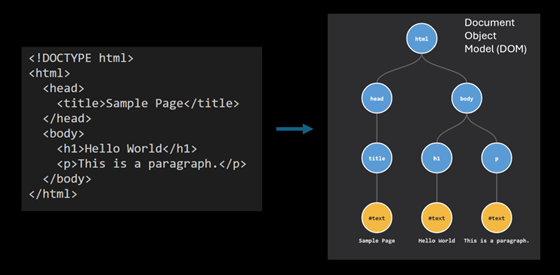
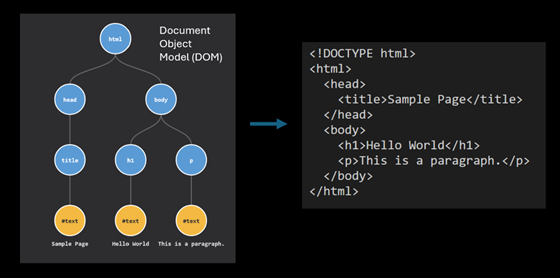
The HTML is parsed into a DOM (Document Object Model) object. When you use your browser’s developer tools to inspect an element on a webpage, you are relying on the DOM. We can also turn a DOM object back into an HTML string if we need to save it somewhere.
For many developers, parsing HTML has long been a source of frustration. While PHP’s DOMDocument class has allowed us to do this, its reliance on the libxml2 library meant it could not handle the kind of HTML that browsers today have to deal with. It tripped up on certain inline JavaScript, leaking the code into other parts of the resulting DOM, and often required unreliable hacks to produce a decent result.
Note: There has been an open issue to add HTML5 support in libxml2 for a while. There also appears to have been some progress in the last year. At the same time, however, the maintainer of the library, Nick Wellnhofer, has announced he is stepping down. So at the time of writing, it’s unclear what the future holds.
With the release of PHP 8.4 in November 2024, that era is finally over.
IPC NEWSLETTER
All news about PHP and web development
PHP 8.4 introduces a massive overhaul to the DOM extension, featuring a new, standards-compliant HTML5 parser [2], native CSS selector support, and a modernized set of DOM classes. These additions make PHP a viable, high-performance choice for web scraping, content extraction, and HTML transformation tasks that previously required slower third-party libraries based on older specs.
Note: From this point on, we will simply use “HTML” rather than “HTML5.” The current standard is called the “HTML Living Standard,” maintained by WHATWG.
I’m slowly updating the PHP Readability library, used for article extraction, to use the new DOM API in PHP. In this article, we’ll explore what’s new, and walk through practical examples of how to migrate your own code.
Technical Foundation
The secret sauce behind PHP 8.4’s parsing capabilities is Lexbor, a high-performance HTML parser written in C by Alexander Borisov. Unlike libxml, Lexbor is based on the WHATWG HTML Living Standard. This means it parses HTML more like a modern web browser does – handling unclosed tags and quirky markup.
Because Lexbor is a C library, it is incredibly fast. It eliminates the overhead of userland parsers (like the popular html5-php library) and often outperforms the libxml parser while providing significantly better accuracy. It is included in the DOM extension by default, requiring no extra configuration or external dependencies.
The integration of Lexbor into PHP, along with the other DOM changes described in this article, came about thanks to Niels Dossche. Niels is a PHP core contributor and researcher at Ghent University.
For backward compatibility, he has ensured that the changes do not affect existing code, by providing the new DOM classes under the Dom namespace.
The Old Way: Parsing with libxml
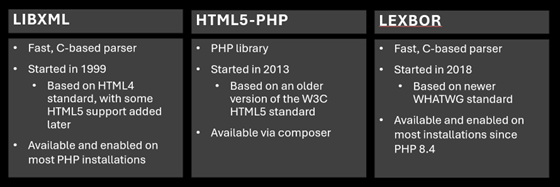
To really appreciate the upgrade, let’s first look at the old way. The native PHP way has been to rely on the DOMDocument class, which uses libxml under the hood. While libxml is excellent for XML, it predates the current HTML Living Standard and has struggled with modern markup for a long time.
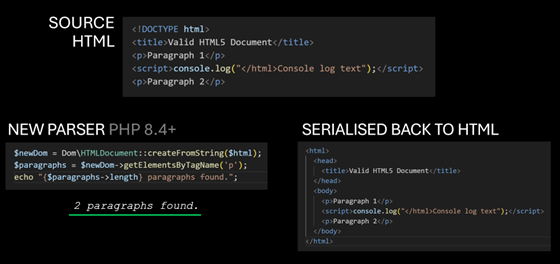
Consider the following HTML document. It contains two paragraphs and a script element in between them.
<!DOCTYPE html>
<title>Valid HTML Document</title>
<p>Paragraph 1</p>
<script>console.log("</html>Console log text");</script>
<p>Paragraph 2</p>
This is valid HTML. A browser knows that </ html> is inside a string in a script element and should be treated as text. However, DOMDocument gets confused.
Note: Many opening and closing tags can be omitted, e.g. < html>, < head>, < body>. The parser will infer them automatically. I want to stress that all the HTML I’m presenting in this article is valid, conforming to the current HTML standard. While the HTML parser spec goes into details about how to handle invalid, non-conforming HTML, we’re setting a lower bar here when comparing parsing results, using HTML you’ll encounter in the wild.
$dom = new DOMDocument();
$dom->loadHTML($html);
$paragraphs = $dom->getElementsByTagName('p');
echo "Found {$paragraphs->length} paragraphs.";
// Output: Found 3 paragraphs.
Why 3 paragraphs, and not 2? Because the DOMDocument sees the </ html> inside the script, assumes the document has ended, and then treats the remaining text (Console log text”);) and the second paragraph as new content outside the body, mangling the structure entirely. If you serialize this back to HTML, you get a broken mess:
<html>
<body>
<p>Paragraph 1</p>
<script>console.log("</script>
</body>
</html>
<html>
<p>Console log text");</p>
<p>Paragraph 2</p>
</html>
![Two-column table mapping CSS selectors to XPath 1.0 expressions, with examples such as div.content, article#main, [src*="avatar"], article p, and article > p, plus two emoji-marked rows showing more awkward XPath equivalents for matching text and links.](https://phpconference.com/wp-content/uploads/2026/04/Picture4.png)
The Workarounds
So what have developers done about this? Historically, there have been two main approaches:
- Use a better parser: The popular library html5-php implements an older W3C HTML5 parsing spec in pure PHP. It’s an improvement over libxml, but it hasn’t kept up with the latest spec (WHATWG’s HTML Living Standard). Additionally, being a PHP implementation means it is slower than C-based parsers like libxml.
- Clean the HTML before parsing: Some developers used the Tidy extension to repair and clean markup before parsing it.
With the new parser, neither of these should be needed now.
Note: Tidy re-writes the HTML in a way that older parsers can sometimes parse better. But not always. I’ve encountered HTML which either Tidy itself struggles with, or in which Tidy’s output doesn’t produce better results when passed to PHP’s DOMDocument.

The New Way: Parsing with Lexbor
With the release of PHP 8.4, PHP introduces the new Dom\HTMLDocument class. When you parse HTML using this class, you are using Lexbor, PHP’s new HTML parser.
Here is how we parse the same document with Lexbor, using the new class:
$dom = Dom\HTMLDocument::createFromString($html);
$paragraphs = $dom->getElementsByTagName('p');
echo "Found {$paragraphs->length} paragraphs.";
// Output: Found 2 paragraphs.
The new parser correctly identifies the context of the script tag and preserves the document structure.
Performance and Standards
Comparing PHP’s new parser with the html5-php library, I found the native PHP implementation is approximately 3.6x faster on average for typical news and blog pages. For larger, more complex documents, users should find it even faster.
More importantly, it adheres to a more recent HTML standard. HTML today is a “Living Standard” maintained by the WHATWG, meaning it has no version numbers and changes over time. Both libxml and html5-php are based on older standards. Lexbor, PHP’s new parser, is based on the more recent WHATWG standard, so is closer to modern browser parsing.
New DOM Classes
To support the new features without breaking decades of existing code, PHP 8.4 introduces a new set of DOM classes under the DOM namespace. These live alongside the existing global classes (like DOMDocument), allowing both APIs to coexist in the same application.
Here is how the key classes map to the new namespace:
- DOMDocument → Dom\HTMLDocument (there is also Dom\XMLDocument for XML)
- DOMElement → Dom\Element
- DOMNode → Dom\Node
- DOMText → Dom\Text
- DOMAttr → Dom\Attr
- DOMXPath → Dom\XPath
Why create new classes instead of fixing the old ones? Niels found that attempts to fix bugs in the old DOM classes caused too many issues because many of us have had to rely on the incorrect behavior. By creating a fresh namespace, the new classes can adhere strictly to the spec while the old classes remain untouched for legacy code.
Migration and Interoperability
Thankfully, migration doesn’t have to be all-or-nothing. You can mix both APIs in the same codebase. And if you need to, you can import legacy DOMNode objects with the importLegacyNode method:
$oldDom = new DOMDocument();
$oldDom->loadHTML('<p>Old node</p>');
$oldElement = $oldDom->getElementsByTagName('p')->item(0);
echo "Old element class: " . $oldElement::class . PHP_EOL;
// Output: Old element class: DOMElement

$newDom = Dom\HTMLDocument::createFromString('<!DOCTYPE html>');
$newElement = $newDom->importLegacyNode($oldElement, deep: true);
echo "New element class: " . $newElement::class . PHP_EOL;
// Output: New element class: Dom\Element
$newDom->body->append($newElement);
// Serialise to HTML
echo $newDom->body->innerHTML;
// Output: <p>Old node</p>
DOM Properties and innerHTML
The new API introduces several quality-of-life improvements that reduce boilerplate code.
IPC NEWSLETTER
All news about PHP and web development
Top-Level Properties
You no longer need to traverse the tree to find the < body > or < head > tags. They are now exposed as first-class properties on the document object:
$html = '<!DOCTYPE html>
<title>Old title</title>
<h1>Hello</h1>';

$dom = Dom\HTMLDocument::createFromString($html);
// Access convenience elements directly
echo $dom->head::class . PHP_EOL; // Dom\HTMLElement
echo $dom->body::class . PHP_EOL; // Dom\HTMLElement
// Read or write the title directly
echo $dom->title . PHP_EOL;
// Output: Old title
$dom->title = "New Title";
echo $dom->head->innerHTML;
// Output: <title>New Title</title>
innerHTML Support
What about getting the HTML content of an element? We now have native innerHTML support.
It works just like JavaScript:
$div = $dom->querySelector('div');

// Read content
echo $div->innerHTML;

// Write content (automatically parses the string into nodes)
$div->innerHTML = '<p>Replaced content</p>';
Note: While_ innerHTML is supported, _outerHTML is not yet available in this release.
CSS Selector Support
Perhaps the most exciting feature for web scraping is native support for CSS selectors. You can finally say goodbye to getElementsByTagName and the complexity of DOMXPath.
The new classes implement querySelector and querySelectorAll, behaving identically to their JavaScript counterparts:
- querySelector($selectors) — Returns the first descendant element that matches the CSS selectors
- querySelectorAll($selectors) — Returns a NodeList containing all descendant elements that match the CSS selectors
$dom = Dom\HTMLDocument::createFromString($html);

// Find the first matching element
$article = $dom->querySelector('article.main');

// Find all matching elements (returns a NodeList)
$links = $dom->querySelectorAll('ul.nav > li > a');
Powerful Selectors
You aren’t limited to basic class or ID selectors. You have access to modern, complex CSS selectors:
Multiple Element Types: Select headers and paragraphs in one go:
$elements = $dom->querySelectorAll('h1, h2, h3, p');
Combinators (:is, :where): Simplify complex grouping:
// Select paragraphs and main headings that are direct children of article
$elements = $dom->querySelectorAll('article > :is(p, h1, h2)');
// Same as
// $elements = $dom->querySelectorAll('article > p, article > h1, article > h2');
State Selectors (:empty, :not):
// Find all paragraphs that are NOT empty
$elements = $dom->querySelectorAll('p:not(:empty)');
Relational Pseudo-class (:has): Get h1 headings that are followed immediately by an h2 heading:
$headings = $dom->querySelectorAll('h1:has(+ h2)');
Get all paragraphs in an article that have at least one link inside them:
$paragraphsWithLinks = $dom->querySelectorAll('article p:has(a)');
Attribute Selectors: Target specific attribute values, including partial matches (note the ‘i’ to signal case-insensitive matching):
// Find secure external links
$secureLinks = $dom->querySelectorAll('a[href^="https://" i]:not([href*="example.com" i])');
Note: One missing feature is the :scope pseudo-class, which can be used to refer to the current element when there’s a need to use a combinator. Using it currently throws a DOMException. $article->querySelectorAll(‘:scope > p’) This is a known limitation in Lexbor, and it is being worked on.
XPath Selectors
While CSS selectors are an excellent new addition, XPath remains available. I recommend using CSS selectors whenever you can, as they’re usually easier and more concise to write.
In the past, people would turn to XPath because CSS selectors were not as powerful as they are today, and they were not available in PHP natively. Those who wanted to use CSS selectors in PHP had to rely on libraries that converted CSS to XPath under the hood, such as Symfony’s CssSelector component.
Nonetheless, XPath can still be used if you need more complex logic in your selectors or if you’re migrating code that already relies on XPath.
![Two-column table mapping CSS selectors to XPath 1.0 expressions, with examples such as div.content, article#main, [src*="avatar"], article p, and article > p, plus two emoji-marked rows showing more awkward XPath equivalents for matching text and links.](https://phpconference.com/wp-content/uploads/2026/04/Picture6.png)
Common CSS/XPath selectors
Namespace warning
It’s important to note that if you’ve previously used XPath with HTML parsed with PHP’s DOMDocument, switching to Dom\HTMLDocument will require that you pay attention to namespaces.
The new parser assigns namespaces to HTML, SVG and MathML elements, in line with the HTML standard. This means XPath queries that worked before may return empty results. Consider this HTML with an embedded SVG:
<article>
<svg width="200" height="100">
<text x="100" y="50">Hello SVG</text>
</svg>
</article>
With the old DOMDocument, a simple XPath query works without any namespace handling:
$dom = new DOMDocument();
$dom->loadHTML($html);
$xpath = new DOMXPath($dom);
$texts = $xpath->query('//article//svg');
// Works: returns the <svg> element
However, with Dom\HTMLDocument, the same query returns nothing because the article and SVG elements are now placed in the HTML and SVG namespaces:
$dom = Dom\HTMLDocument::createFromString($html);
$xpath = new Dom\XPath($dom);
$texts = $xpath->query('//article//svg');
// Returns empty! The elements are in a namespace.
To fix this, you must register the namespace and use a prefix in your XPath:
$dom = Dom\HTMLDocument::createFromString($html);
$xpath = new Dom\XPath($dom);
$xpath->registerNamespace('h', 'http://www.w3.org/1999/xhtml');
$xpath->registerNamespace('s', 'http://www.w3.org/2000/svg');
$texts = $xpath->query('//h:article//s:svg');
// Works: returns the <svg> element
However, this does have a downsider: if your source HTML uses < template > elements, the contents of those elements will no longer be hidden when working with the DOM.
Serialize to HTML
Serialization is turning the DOM object you’ve been working with into an HTML string. If you need to save the results as an HTML file or store it in a database, you’ll want to serialize.
// Save the entire document
echo $dom->saveHtml();

// Save a specific node (and its children)
echo $dom->saveHtml($dom->body);
Practical Examples
Now that we understand the API, let’s put it to work in some real-world scenarios.
Web Scraping
Here is an example of extracting quotes and their authors into an array:
use Symfony\Component\HttpClient\HttpClient;
// Fetching the content
$client = HttpClient::create();
$response = $client->request('GET', 'https://quotes.toscrape.com/');
$html = $response->getContent();

// Parsing HTML with Lexbor
$dom = Dom\HTMLDocument::createFromString($html);

// Extract quotes using CSS selectors
$quotes = [];
foreach ($dom->querySelectorAll('.quote') as $element) {
$quote = $element->querySelector('.text')->textContent;
$author = $element->querySelector('.author')->textContent;
$authorUrl = $element->querySelector('a[href ^= "/author/"]')->getAttribute('href');
$quotes[] = [
'quote' => mb_trim($quote),
'author' => mb_trim($author),
'authorUrl' => $authorUrl
];
}

print_r($quotes);
JavaScript-rendered HTML
When working with real-world web pages, you will likely encounter HTML that contains shell elements that are then filled with content after JavaScript has been executed in your browser.
If the content you’re after requires JavaScript rendering, you will want to use a headless browser. There are services you can use for this, or if you’re testing locally, you can use Chrome’s –dump-dom flag:
chrome --headless --dump-dom https://quotes.toscrape.com/js/
You can capture the output in PHP with the following:
$url = 'https://quotes.toscrape.com/js/';
$command = 'chrome --headless --dump-dom ' . escapeshellarg($url);
$html = shell_exec($command);
Removing elements
A common task when working with HTML is to remove the bloat that is often interleaved with the content that you want to extract. This can be ads, related links, social media share buttons, and so on.
With CSS selectors, it’s easy to target all these in one comma-separated selector list.
$dom = Dom\HTMLDocument::createFromString($html);

// Remove clutter (scripts, styles, navs, footers)
$selector = 'script, style, nav, footer, aside, .ad-banner, .social-share';
foreach ($dom->querySelectorAll($selector) as $clutter) {
$clutter->remove();
}
Extracting article content
If you’re working with web articles (e.g., news stories, blog posts), I maintain the PHP port of Readability.js, which can be useful to isolate the content HTML automatically before you parse and work on it further.
use fivefilters\Readability\Readability;
use fivefilters\Readability\Configuration;

// Article URL
$url = 'https://www.medialens.org/2020/cogitation-meditation-in-an-age-of-cataclysms/';
// for simplicity we'll use file_get_contents() here
$html = file_get_contents($url);

// Configure Readability
$configuration = new Configuration([
'fixRelativeURLs' => true,
'originalURL' => $url,
]);

// Detect and extract article body
$readability = new Readability($configuration);
$readability->parse($html);
$contentHtml = $readability->getContent();
$dom = Dom\HTMLDocument::createFromString($contentHtml);
HTML Sanitization
When working with HTML you have not produced yourself (e.g., HTML you have fetched, or user-submitted content), you are handling untrusted HTML. Before outputting it for display, you should sanitize it to prevent XSS attacks. Symfony’s HTML Sanitizer component is designed for this.
use Symfony\Component\HtmlSanitizer\HtmlSanitizer;
use Symfony\Component\HtmlSanitizer\HtmlSanitizerConfig;

$config = new HtmlSanitizerConfig()->allowSafeElements()->allowRelativeLinks();
$sanitizer = new HtmlSanitizer($config);

$dirty = '<a href="/page" onclick="alert(\'XSS\')">Click</a>';
echo $sanitizer->sanitize($dirty);
// Output: <a href="/page">Click</a>
The sanitizer automatically strips dangerous attributes like onclick while preserving allowed elements and attributes.
IPC NEWSLETTER
All news about PHP and web development
Migration Guide
Migrating to the new API is generally straightforward, but there are a few key differences to be aware of.
Class Mapping
- new DOMDocument() → Dom\HTMLDocument::createEmpty()
- $dom->loadHTML( $ html) → Dom\HTMLDocument::createFromString($html)
- $dom->loadHTMLFile( $ file) → Dom\HTMLDocument::createFromFile($file)
- DOMElement → Dom\Element
- DOMXPath → Dom\XPath
Replacing HTML5-PHP
If you are currently using the HTML5-PHP library, you can likely remove it entirely.
Old way (HTML5-PHP):
$html5 = new Masterminds\HTML5();
$dom = $html5->loadHTML($html);
New way (Native):
$dom = Dom\HTMLDocument::createFromString($html);
Not only is the code cleaner, but you will also see an immediate performance improvement. Note, however, that HTML5-PHP returns the legacy DOMDocument object after parsing, while the new code above returns Dom\HTMLDocument. So you might notice some differences in the API.
PHP 8.5 and the new URI Extension
PHP 8.5 introduces an updated URL parser. When working with HTML, we often also work with URLs. If you’ve used the parse_url function in the past, I recommend switching to the new URI extension.
Conclusion
The introduction of Dom\HTMLDocument in PHP 8.4 is a major update to PHP’s HTML capabilities. It transforms PHP from a language that could do HTML parsing (with enough caveats and libraries) into a language that really excels at it.
Whether you are building a simple scraper or a complex content transformation engine, there has never been a better time to do it in PHP.
Special thanks to Niels Dossche for his incredible work on this extension and Alexander Borisov for the Lexbor project.
Further Readings
Author
🔍 Frequently Asked Questions (FAQ)
1. What are the limitations of native HTML parsing in PHP?
Native PHP tools like DOMDocument can struggle with malformed or invalid HTML, which is common in real-world pages. They often require manual error handling and configuration to suppress warnings. This reduces reliability when processing inconsistent markup.
2. Why is DOMDocument commonly used for HTML parsing in PHP?
DOMDocument is widely used because it is built into PHP and allows developers to parse HTML into a traversable DOM structure. It supports standard methods for querying and manipulating elements. Despite its limitations, it remains a default choice due to its availability.
3. What are modern alternatives to DOMDocument in PHP?
Modern libraries such as Symfony DomCrawler and HTML5-PHP provide better support for HTML5 and malformed documents. They offer more intuitive APIs and improved parsing accuracy. These tools are better suited for robust data extraction and scraping tasks.
4. Why is HTML5-compatible parsing important in PHP?
HTML5-compatible parsers correctly interpret modern web standards and handle imperfect markup more gracefully. This reduces parsing errors and ensures consistent results. It is especially important when working with dynamic or user-generated content.
5. Why should you avoid using regex for HTML parsing?
Regex cannot reliably handle the nested and hierarchical structure of HTML documents. Complex or malformed markup can easily break regex-based approaches. Dedicated parsers are designed to correctly interpret and navigate HTML structure.